
Prepare a deal price with anVendor and Zapier
Use company research and estimated subscription spend to prepare a pricing range for a sales conversation. Connect anVendor to Zapier with OAuth.
Before quoting a prospect, you want a sensible starting point. Which services do they use? What might a comparable subscription cost? Can your proposed price cover the work involved?
Enter a company's website address in anVendor to research the services it uses, with estimated annual spend where available. Zapier can combine those estimates with your delivery costs and pricing rules.
The workflow: add a company website and your assumptions, then receive a price range to review before the sales call.
The result is a starting point for discussion. A domain analysis cannot tell you the buyer's budget or the single best price for a deal.
The walkthrough uses a Zapier Table and a button as one example. You can also start from a CRM deal and send the research to the worksheet, proposal tool or approval process your team already uses.
1. Choose a fair comparison
Choose one service your offer could replace. Compare similar users, features and service levels.
A company's total subscription spend is not a budget available for your product. If you sell an add-on, the main service's spend can provide context, but it is a weaker basis for setting your own price.
Before building the Zap, write down your annual delivery cost and target gross margin. Include onboarding and migration work when comparing first-year costs.
2. Connect anVendor by signing in
You need an anVendor account with credits and a Zapier account that supports the multi-step workflow.
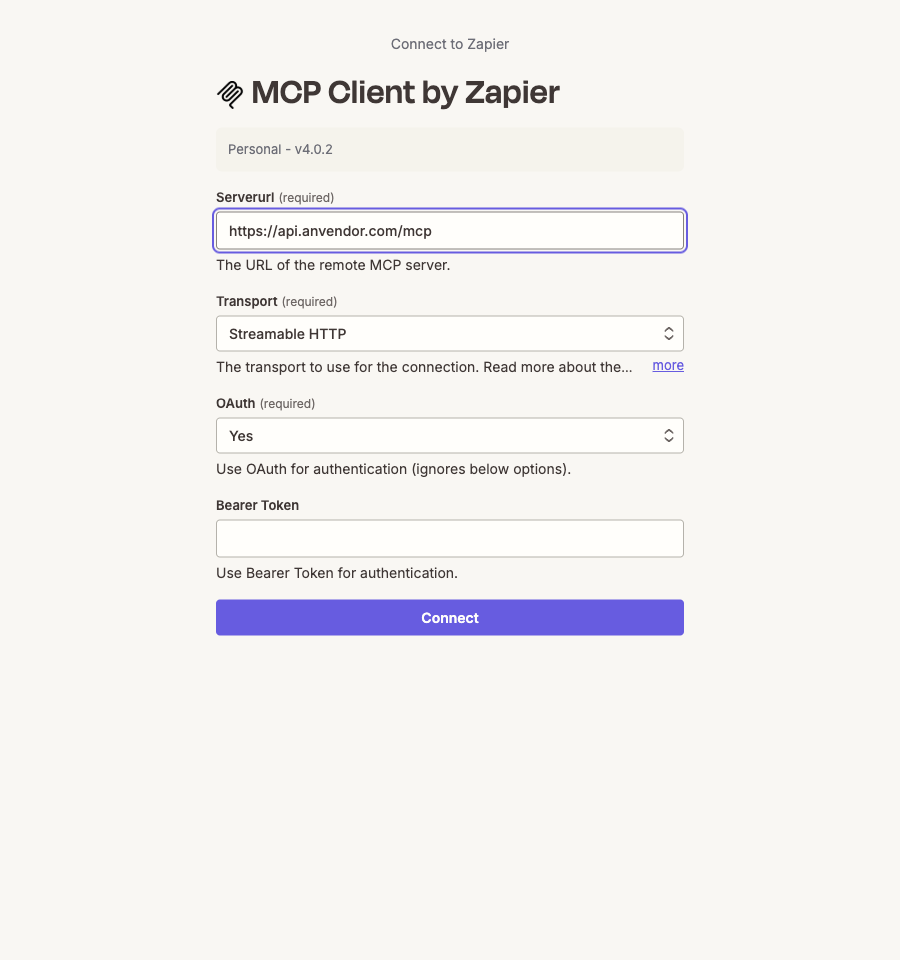
Open App connections → Create connection in Zapier and choose MCP Client by Zapier:
| Setting | What to enter |
|---|---|
| Server URL | https://api.anvendor.com/mcp |
| Transport | Streamable HTTP |
| OAuth | Yes |
| Bearer Token | Leave empty |
Click Connect, sign in to anVendor and allow Analyze companies. Set a small credit limit for testing. OAuth handles the connection; you do not copy a bearer token. Zapier's connection instructions.
A company analysis costs 1 credit, refunded if it fails or finds no subscriptions. It can still cost a credit if other services are found but your chosen comparison is missing. Reading an already purchased fresh analysis is free; requesting a new scan can charge again. Your connection limit uses the credits already in your account. anVendor credit rules.
3. Add the deal to a research table
Create a Zapier Table called Deal pricing research. Think of it as a deal worksheet.
For each deal, enter the company domain, the service you want to compare, your annual delivery cost, your target margin and the discount you want to explore. Add an Analyze company button.
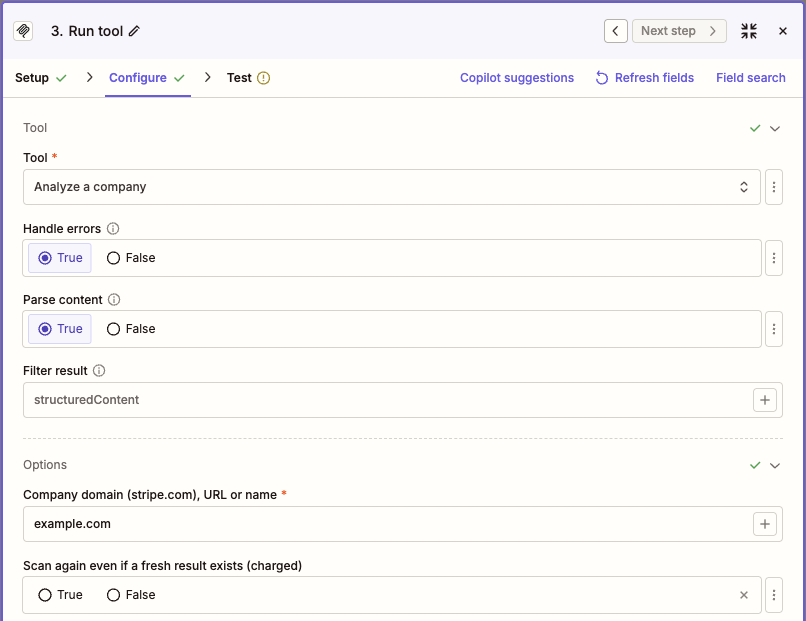
Use just the domains, such as example.com for the company and slack.com for the service. Leave out https://, www. and page links, and keep both domains unchanged while the analysis runs.
The step-by-step setup guide includes the exact table fields, Zap settings and calculation script. Your colleague who manages Zapier can use it to build the workflow.
In the button's Zap, choose MCP Client → Run tool → Analyze a company. It starts the research and saves a reference number. A second Zap checks for the result each hour and updates the same deal row. If the analysis is still running, Zapier keeps checking that reference number.
Allow five to ten minutes for an analysis, and longer for a large company. The hourly check collects it when ready; it does not start another paid analysis.
4. See how the suggested range is calculated
Here is a fictional example in US dollars:
| Input | Example |
|---|---|
| Estimated annual spend on the comparable service | $12,000–$24,000 |
| Your annual cost to deliver the offer | $3,600 |
| Your target gross margin | 60% |
| Discount you want to explore | 20% below the estimate's lower end |
First, find the minimum price that meets your margin target. A 60% gross margin leaves 40% of revenue for delivery costs:
$3,600 ÷ 40% = $9,000 per year.
Next, calculate the comparison price using your chosen 20% discount:
$12,000 × 80% = $9,600 per year.
Under these assumptions, the discussion range is $9,000–$9,600 per year. The discount is your scenario, not an anVendor recommendation. The spend estimate is not a verified invoice.
Zapier saves the range with the comparison service, research date and assumptions so your team can check the reasoning.
5. Review before you quote
The workflow shows Needs review when it lacks a usable estimate, the research is old or incomplete, or your minimum price is higher than the comparison price. Missing spend stays unknown; it does not become zero.
Test with one company you intend to research. Confirm that the result belongs to the right company and service, and check the calculation before enabling the workflow.
Use the range to prepare your next discovery conversation:
- How many users and which features must the offer cover?
- What are the current contract and migration costs?
- What business result would make a change worthwhile?
Once you know the scope and value, adjust the price using your team's normal approval process. Keep the worksheet as internal preparation until you are ready to send a quote.
Fit the research into your deal process
You can adapt the example in several ways:
- Prepare a CRM deal: a deal reaches the proposal stage → anVendor research → pricing notes on the existing deal.
- Use your own cost model: anVendor's estimated spend → your Google Sheets pricing worksheet → sales-manager review.
- Prepare a proposal brief: anVendor research + your CRM's agreed scope → an internal brief for your proposal or quoting tool.
These are alternative combinations to build, using your own pricing rules and approval steps. Keep the analysis reference until the result is ready, and carry the estimates and assumptions into the destination you choose. Your team reviews the final price before sending a quote.
Suggest a correction · Sources and estimate limitations
Leads already using your competitor
Discover companies using SaaS and business services, with estimated adoption and annual spend to help qualify each opportunity. Free to start.
Get started free